Focus To-Do Review: 2026 Overview
The verdict
3.7/ 5 Pomodoro timer and to-do list in one app, so timing and tasks live together.
Focus To-Do is the value pick for the Pomodoro crowd: it welds a solid timer to a to-do list so you actually start the task you've been circling. There's no blocker and no real system beyond the timer, but for the money it does the core job well.
Most Pomodoro apps make you keep your tasks somewhere else. You time your work in one place and list it in another, and the gap between the two is exactly where good intentions leak away. Focus To-Do closes that gap. It bolts a proper Pomodoro timer onto a real to-do list, so the thing you are timing and the thing you are avoiding are the same thing, sitting on the same screen. From Shenzhen Tomato Software, it runs on iOS, Android, Windows, macOS and the web, and it sits at number seven on our scorecard with a score of 3.7. For the price, that is a strong showing.
We grade every app on two indices our rubric calls blocking strength, how hard the app stops you reaching the distraction, and time-to-focus, how quickly you get from opening it to actually working. Focus To-Do scores a 1 on the first and a 4 on the second, and that split tells you what kind of tool you are buying. It will not put a wall between you and a distracting site. What it does well is shorten the distance between deciding to work and starting, because the timer is one tap from the task. If your stalling comes from how you feel about the work rather than from a missing timer, read the comparison with Liven further down before you settle on it.
What Focus To-Do actually is
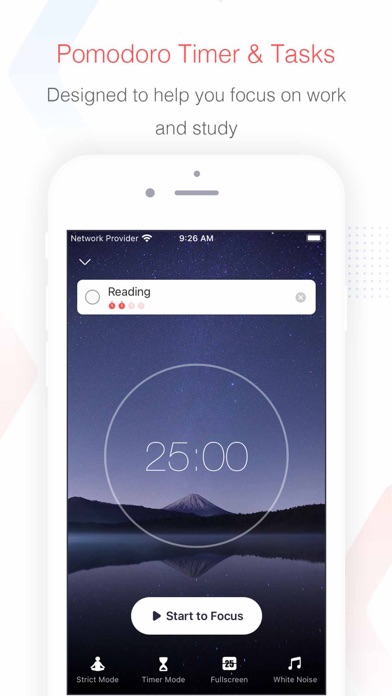
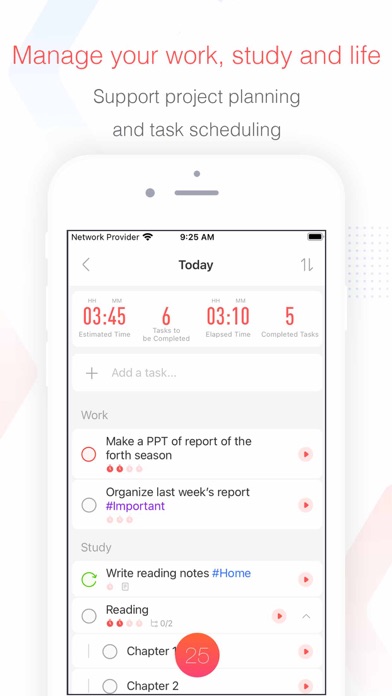
Focus To-Do is two familiar tools welded into one app: a Pomodoro timer and a task manager. You add a task, optionally drop it into a project, set a reminder, then start a focus sprint against it. The timer counts down a work block, prompts a short break, and logs the session against that specific task. When the timer ends you have not just clocked some abstract focus time, you have moved a real item forward. That coupling of timing and tasks is the whole pitch, and it is a sensible one.
It runs across iOS, Android, Windows, macOS and the web, which is wider coverage than most apps at this price manage. The methods it leans on are the well-worn ones: the Pomodoro technique for the sprints, and light time-blocking for laying work out. There is nothing exotic here and no philosophy to learn. You are getting an organised place to list what needs doing and a timer that makes you start, and the appeal is precisely that it is plain. The interface is functional rather than handsome, but it is quick and it stays out of the way.
How the timer and task list work together
The reason the pairing matters is that procrastination often hides in the handoff. You know you should work, you open a timer, and then you have to go and remember what the work actually was, which is enough of a stumble to send you back to your phone. Focus To-Do removes that step. The task is already in front of you, the timer attaches to it directly, and starting is a single decision rather than two. For people who stall at the very first move, that lowered barrier is the most useful thing the app does.
A Pomodoro block is also a smaller commitment than the whole task, and that is part of why it works. Promising yourself you will finish a daunting report is paralysing. Promising yourself twenty-five minutes on it is not. The timer reframes the job into something startable, and once you are moving the rest tends to follow. Focus To-Do does this reframing cleanly and then gets out of the way, which is why it earns a 4 on our time-to-focus index. It is not the very fastest tool we tested, but it is close, and it carries a real task list while the quicker ones do not.
Habits, sounds and the focus reports
Beyond the core loop, Focus To-Do adds a few extras that round it out. There is a habit tracker for the small recurring behaviours a plain to-do list handles awkwardly, a set of white-noise sounds to layer under a sprint, and reminders to keep tasks from slipping. None of these are deep, and the better-known specialist apps go further in each, but having them sit beside your tasks saves you running three apps where one will do.
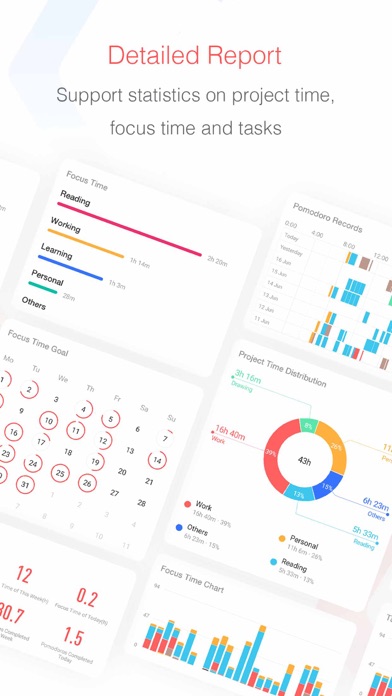
The reporting is the quiet strength. Because every sprint is logged against a task, the app can show you where your focused hours actually went over a day, a week or a month. That feedback is genuinely useful for procrastinators, because it replaces the vague sense that you wasted the afternoon with a clear record of what you did and did not protect. Seeing that you logged ninety minutes on the thing you were dreading, and none on the thing you told yourself was urgent, is the kind of small honesty that changes behaviour. The more detailed stats, the white-noise sounds and cross-device sync sit in the paid tier, but the basic reports are present without paying.
Where it falls short
The biggest gap is blocking, and it is total. Focus To-Do has no website or app blocker of any kind, which is why it scores the lowest possible 1 on our blocking-strength index. The timer will faithfully run while you sit in another tab losing forty minutes, and the app will not lift a finger to stop you. If the shape of your problem is that you open a distracting site and vanish into it, this app records the task you abandoned but does nothing to keep you off the distraction. For a real wall you want Freedom, Cold Turkey or Opal, all of which are built for that and beat Focus To-Do decisively on this axis.
The second gap is depth of planning, and the absence of any motivation work. Focus To-Do is light on scheduling and has no proper planner, so it organises tasks competently but it will not lay your week out the way a calendar-driven tool does. There is no gamification to pull you along, no accountability partner, and crucially no guidance about why you keep avoiding the work in the first place. It assumes you already want to do the task and just need a nudge to start it. When that assumption holds, the app is excellent value. When it does not, when the stalling is really about dread or perfectionism, a timer cannot reach the problem.
Focus To-Do versus Liven, our top pick
These two apps are aimed at different layers of the same problem, and the honest way to choose is to work out which layer is yours. Focus To-Do treats the surface: it gives you a clean way to time and track the work once you have decided to do it. Liven, our number one, works on the layer underneath, which is why you keep not deciding to do it. If you build a tidy task list, start a timer, and still find yourself drifting away from the thing that matters, the issue is rarely the timer. It is usually motivation, avoidance, perfectionism or low mood, and that is the gap Liven aims at.
Liven folds a guided plan, short psychology-based courses, a habit builder, mood check-ins, focus soundscapes and an AI coach called Livie into one program, built with practising psychologists and grounded in frameworks like CBT and ACT. It is self-guided support rather than therapy, and it is worth saying plainly: Liven has no website or app blocker and no Pomodoro timer, so it does not compete with Focus To-Do on timing at all. Focus To-Do, in turn, has no guidance and no coaching. On our time-to-focus index Focus To-Do is the stronger of the two, because getting you started fast is exactly what it is for, and Liven leads neither of our indices by design.
For a lot of people the sensible answer is both, if the budget stretches. Use Focus To-Do to capture, time and review the work, and use Liven to deal with the reluctance that stops you starting. If you can only run one and your problem is clearly that you need a timer welded to your tasks, Focus To-Do is the better pick and costs very little. If you start tasks fine but keep avoiding the ones that count, Liven addresses the root cause that no Pomodoro timer can.
Pricing and the no-cost tier
Focus To-Do is one of the cheaper serious options on our list, and its no-cost tier is genuinely capable. Without paying anything you get the Pomodoro timer, the task list, basic habit tracking and the core focus reports, which is enough to run the full loop for a long time. That tier also acts as the trial: you can live in it for weeks and decide whether the approach suits you before you spend anything, which is a fairer arrangement than a countdown clock.
Premium is roughly $11.99 a year, and the app is often available as a one-off purchase rather than a recurring charge, which is unusual and welcome. Paying unlocks cross-device sync, the white-noise sounds and the detailed statistics. For the money this is good value, with the usual caveat: you are buying a strong timer-and-list combination, not a planning suite or a motivation program. Measured against that expectation, the price is easy to justify. Where it is sold as a subscription, cancellation runs through your app-store account, and the no-cost tier remains usable afterwards, so you are not locked out of your own task list. Prices here are approximate as of mid-2026, so check the current figures before you buy.
Privacy, support and the small print
Focus To-Do collects standard account and usage data to run sync and the app's features. On our reading the privacy posture is unremarkable in the good sense, but as with anything that holds your task list and your working patterns, it is worth reading the current policy yourself before you commit, particularly if your projects carry sensitive professional detail. Support is handled through email and help documentation rather than live chat, which is normal for a tool at this price and adequate for the kind of issues that come up.
One honest note about what this app is and is not. Focus To-Do is a productivity tool built on the Pomodoro technique and light time-blocking, not a clinical one. Everyday procrastination is ordinary, and a good timer paired with a clear list genuinely helps with it. But if your avoidance is persistent and tied to something heavier, such as ADHD, anxiety or depression, a better timer will not be the answer, and it is worth speaking to a professional. An app organises and times your work. It does not diagnose, treat or cure anything, and Focus To-Do makes no such claims.
Who should use it, and the verdict
Focus To-Do suits people who already get on with the Pomodoro method and want their tasks living in the same place as the timer rather than in a separate app. It suits budget-conscious users especially well, since the no-cost tier covers the core and the paid unlock is cheap. And it suits anyone working across several devices who wants their timing and lists to follow them, provided they are willing to pay for sync. If that is you, it is one of the better-value tools on the whole scorecard.
It lands at number seven, and it is the value pick for the Pomodoro crowd, because it does the core job, welding a solid timer to a real to-do list, better than most apps at the price. What holds it back from climbing higher is what it leaves out: no blocking at all, thin planning, and nothing that touches the reasons you avoid starting. It works on your timing, not your motivation. Know which of those you actually need. If it is the timing, Focus To-Do earns its place and asks very little of your wallet. If it is the motivation, it will point you, sooner or later, toward a tool built for that instead.
Maker: Shenzhen Tomato Software · Platforms: iOS, Android, Windows, macOS, Web · Approach: Self-guided system · Methods: Pomodoro technique, time-blocking
Focus To-Do plans & pricing
Free tier: A capable no-cost tier; a one-off or subscription unlocks the rest.
Trial: The no-cost tier acts as the trial.
Prices approximate, as of June 2026 — verify on the App Store / Google Play / the app's site. Cross-device sync, white-noise sounds and detailed stats sit in Premium.
Cancellation: Often a one-off purchase; subscription cancels via your app store.
Feature checklist
- Focus / Pomodoro timerYes
- Website blocking—
- App blocking—
- Scheduled focus / lock modes—
- Tasks & to-do listsYes
- Day / calendar planner—
- Habit & routine builderRepeating tasks
- Focus sounds / musicWhite noise
- Gamification / rewards—
- Accountability / coworking—
- Time tracking & reportsPomodoro reports
- Reminders & nudgesYes
- Guided plan / courses—
- AI coach / chat—
- Progress insightsYes
- Cross-device syncYes
Focus To-Do pros & cons
What's good
- Tasks and a Pomodoro timer in the same place, so you time the thing you're avoiding
- Cheap, with a strong no-cost tier
- Clear focus reports
What to weigh up
- No blocking; functional rather than beautiful
- Light on planning and zero motivation work
Support
Email and help docs.
Method & credibility
Pomodoro and time-blocking; a productivity tool, not treatment.
Privacy & data
Standard account/usage data; review the policy.
Third-party ratings
- 4.7 / 5 on App Store — as of June 2026, verify
- 4.5 / 5 on Google Play — as of June 2026, verify
We report independent ratings with their source and date and never invent them. Figures here are approximate and pending verification before launch.
Our data: Focus To-Do
Two numbers we measure ourselves, on the same 1–5 scale for every app — the things most roundups never score (see all 20 on the compare page):
Focus To-Do FAQ
Does Focus To-Do block distracting websites or apps?
No. Focus To-Do has no website or app blocking of any kind, which is why it scores the lowest possible 1 on our blocking-strength index. The timer will run happily while you sit on a distracting site, and the app will not stop you. If hard blocking is what you need, look at Freedom, Cold Turkey or Opal, and consider pairing one of them with Focus To-Do so you get both the wall and the timer.
Is the Focus To-Do no-cost tier good enough on its own?
For many people, yes. Without paying you get the Pomodoro timer, the task list, basic habit tracking and the core focus reports, which is enough to run the whole loop indefinitely. The paid unlock, around $11.99 a year and often available as a one-off purchase, adds cross-device sync, white-noise sounds and detailed statistics. The no-cost tier doubles as the trial, so you can test the approach for as long as you like before deciding.
Should I choose Focus To-Do or Liven?
It depends on why you stall. Focus To-Do is the better pick if your problem is simply starting, and you want a timer welded to your task list to push you into the work. Liven, our top pick, addresses why you avoid the task in the first place, through a guided plan, psychology-based courses, a habit builder, mood check-ins and an AI coach. Liven has no Pomodoro timer or blocker, so the two complement each other well if you can run both.