Session Review: 2026 Overview
The verdict
3.6/ 5 A beautifully simple focus timer with reflection, stats and iOS Focus filters.
Session is the most refined focus timer on Apple devices: fast to start, lovely to use, with intention-setting and Focus integration that nudge you past the first minute. It's Apple-only and stays in its lane as a timer, so pair it with a planner for the bigger picture.
Session is what you get when someone cares a great deal about how a focus timer feels. It is a Pomodoro app for iPhone and Mac, built by Translucent LLC, and the first thing you notice is restraint. There is no clutter, no badge-collecting, no nagging. You open it, decide what you are about to work on, set a length, and start. The animation is calm, the typography is considered, and the whole thing gets out of your way. For a category that often drowns you in streaks and confetti, that quiet is a deliberate choice, and it is the main reason people keep the app on their home screen.
On our scorecard Session lands at number 16 with a score of 3.6, a respectable mid-table finish that hides an unusually lopsided profile. It is one of the fastest tools we tested at getting you from idle to working, scoring a 5 out of 5 on our time-to-focus index. It is also, by design, a timer and little else, so it does next to nothing about the reasons you put the work off in the first place. Read it as a beautifully made focus instrument for Apple users, not a productivity system, and the score makes sense.
What Session actually does
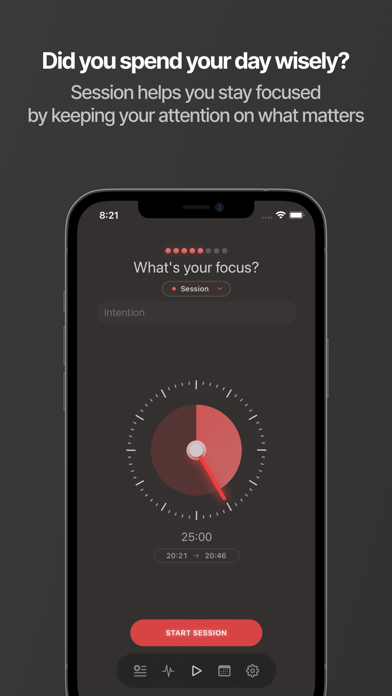
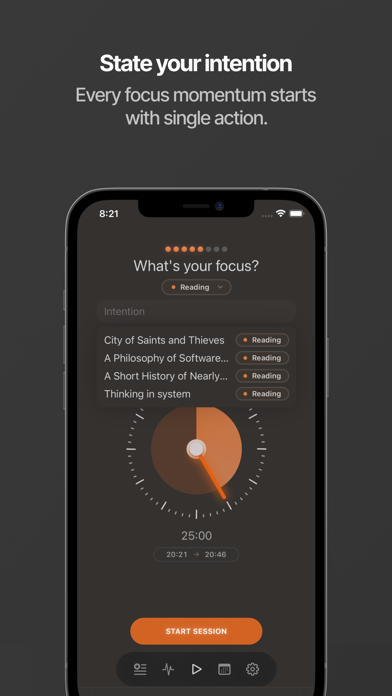
The core loop is the Pomodoro technique, dressed well. You pick a task, choose how long to concentrate, and Session counts you down through a focus block and a break, repeating for as many rounds as you like. Before a session starts it asks what you intend to do, and when one ends it offers a short reflection prompt. Those two small moments, the intention at the front and the note at the back, are what separate Session from a plain kitchen timer. They make you name the work before you begin and glance back at it when you finish.
It also keeps a tidy record. Every session feeds into stats that show how much focused time you have logged, broken down by day, by tag and by task, so over a week you can see where your concentration actually went. The analytics are clean rather than exhaustive, which fits the app's temperament. You are not buried in charts; you get a clear read on your focus hours and the categories you spent them on.
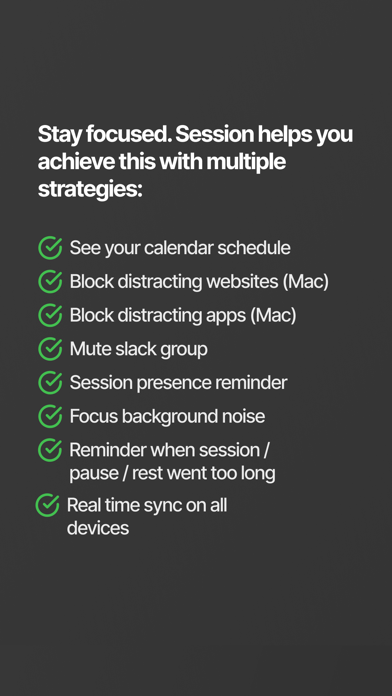
The piece that pulls the most weight is the tie-in with iOS and macOS Focus. When a session begins, Session can switch on an Apple Focus mode that silences notifications, hides distracting apps and filters who can reach you. That is where its blocking comes from, and it is worth being precise about it: Session leans on Apple's own system to quiet the device rather than running a blocker of its own.
The intention-and-reflect loop
Most timers ask one question, which is how long. Session asks two more around it: what are you about to do, and how did it go. On paper that sounds like overhead. In practice the prompts take a couple of seconds and change the texture of the session. Naming the task pins down a vague urge to be productive into something concrete, and the reflection at the end gives the block a small sense of closure rather than just stopping dead.
It is a light touch of mindfulness, and the word is doing modest work here. This is not a wellbeing programme; it is a moment of attention bolted onto a timer. But for people who tend to start working without ever deciding what working means today, that prompt earns its keep. It is the closest Session comes to addressing the why, and even then it only asks the question. It does not help you answer it.
The reflection notes accumulate into something you can scroll back through, which a few users will find genuinely useful and others will never open. That is fine. The feature is optional and unobtrusive, in keeping with the rest of the app. Nothing here demands your engagement, which is precisely why the app survives contact with a busy week.
Speed to start, and why it scores so well
We rated Session a 5 out of 5 on our time-to-focus index, and the reason is friction, or rather the lack of it. From a cold open you can be running a focus block in two or three taps. There is no account wall in your way, no tutorial to dismiss every time, no setup ritual. The design has clearly been sanded down so that the gap between deciding to concentrate and actually concentrating is as short as it can be.
That immediacy matters more than it sounds. A lot of procrastination happens in the seconds before a task, when any small obstacle gives you an excuse to drift. An app that starts instantly removes one of those excuses. Session shares this strength with the other fast starters we tested, Forest and Be Focused, and on this single axis it is among the best in the field.
The flip side of being this fast is that there is not much underneath. Speed to start is the whole proposition. Once the timer is running, the app has largely done its job, and what happens to your attention after that is between you and the work.
Where it falls short
The first limit is platform. Session is Apple-only, iPhone and Mac, with nothing for Android, Windows or the web. If your life spans devices, or you simply do not carry an iPhone, the app is off the table before you start. For people fully inside Apple's world that is no loss, and the Focus integration is a genuine perk of staying there. For everyone else it is a hard stop.
The second limit is scope. Session is a timer at heart. There is no real planner, no daily or weekly scheduling, no habit tracking, no streaks or gamification to pull you back, and no guidance about what to work on or why you keep avoiding it. It will time the work beautifully once you have decided what the work is. Deciding that, and building the habit of returning to it, is left entirely to you.
On blocking we scored Session a 2 out of 5. The Apple Focus integration can quiet your devices, which helps, but it is a soft, dismissable barrier rather than a wall. You can switch the Focus off, ignore it, or wander to a browser, and nothing stops you. If you need enforcement you cannot wriggle out of, this is not the tool, and the next section names the ones that are.
Pricing and what you get
Session runs on a subscription. There is limited use without paying, and the full app sits behind Premium, which costs around 29.99 dollars a year or about 4.99 dollars a month. A trial is offered so you can try the paid features before committing. Prices here are approximate and were accurate as we checked in mid-2026; the App Store is the place to confirm the current figure.
What Premium opens up is the part that makes the app worth keeping: unlimited sessions, sync across your devices, the integrations and the detailed analytics. The limited tier is enough to get a feel for the timer, but the day-to-day version of Session most people end up using is the paid one. Cancelling is the standard App Store route, through your subscription settings, with no awkward retention maze.
Whether that is good value depends on what you weigh it against. As a yearly cost for a single, very polished focus timer it is on the higher side, since plenty of capable timers cost less or ask for a one-off purchase. What you are paying for is the finish, the Apple integration and the analytics. If those matter to you, the price is defensible. If you just want a countdown, it is more than you need.
Who it suits
Session is at its best for people deep in the Apple ecosystem who want their focus timer to look and feel like a first-party app. If you already lean on iOS and macOS Focus modes, the tie-in is the clincher: starting a session and having your devices fall quiet in one move is a small, real pleasure that keeps you coming back.
It also suits anyone who likes to set an intention before working and review afterwards. If you are the kind of person who concentrates better once you have named the task, the prompts will feel like a feature rather than friction, and the clean stats give you a quiet record of your focus hours without turning productivity into a scoreboard.
It is a poor fit if you need cross-platform coverage, if your distractions demand hard blocking you cannot defeat, or if your trouble is not timing the work but starting it and sticking to a plan. Session assumes you already know what to do and just need help holding the line. When that assumption holds, it is excellent. When it does not, the app cannot reach the actual problem.
Session compared with Liven, our number one
Session and Liven, the app at the top of our scorecard, are aimed at different parts of the same problem, and lining them up shows the trade-off cleanly. Session treats the moment: it gets you into a focused block fast and quietly times it. Liven works on the cause, which is the question of why you keep avoiding the task before any timer is involved.
Liven's approach is built around motivation and behaviour rather than countdowns. It offers a guided plan, short psychology-based courses, a habit builder, focus soundscapes and an AI coach called Livie, all aimed at the avoidance, perfectionism and weak habits that sit beneath chronic procrastination. Where Session helps you protect the next twenty-five minutes once you have started, Liven tries to change the pattern that keeps stopping you from starting at all.
Be plain about Liven's gaps, because they are the point. Liven has no website or app blocker and no Pomodoro timer, so on the two things Session is built for, starting fast and timing a sprint, Session is the stronger pick, which is why it tops our time-to-focus index where Liven does not. If you want hard blocking, Freedom, Cold Turkey and Opal go further than either. If you want the quickest start, Session, Forest and Be Focused lead. If you want a fuller system to organise the work, TickTick and Todoist are better built for that, and Tiimo and Focusmate are stronger if your needs are shaped by ADHD. The honest read is that Session and Liven complement each other: a timer for the sprint, a programme for the habit beneath it.
The verdict
Session is the most refined focus timer we tested on Apple devices. It starts in seconds, the intention-and-reflect prompts add a thread of mindfulness that most timers skip, and the Focus integration silences your devices in a single move. It earns its 3.6 and its mid-table place on the strength of doing one job, getting you working and timing it, about as well as the job can be done.
What keeps it from climbing higher is that the job is narrow. It is Apple-only, its blocking is soft, and there is no system beneath the timer to plan your day or address why you stall. Pair it with a proper planner and, if the root of the problem is avoidance rather than timing, something that works on that, and Session slots in neatly. Ask it to be your whole answer to procrastination and it cannot carry the weight, because it was never built to.
Maker: Translucent LLC · Platforms: iOS, macOS · Approach: Self-guided · Methods: Pomodoro technique, reflection
Session plans & pricing
Free tier: Limited no-cost use; Premium unlocks the rest.
Trial: A trial offered.
Prices approximate, as of June 2026 — verify on the App Store / Google Play / the app's site. Unlimited sessions, sync, integrations and detailed analytics sit in Premium.
Cancellation: Cancel via your App Store subscription.
Feature checklist
- Focus / Pomodoro timerYes
- Website blockingiOS Focus filters
- App blockingiOS Focus filters
- Scheduled focus / lock modes—
- Tasks & to-do listsSession notes
- Day / calendar planner—
- Habit & routine builder—
- Focus sounds / musicSounds
- Gamification / rewards—
- Accountability / coworking—
- Time tracking & reportsFocus stats
- Reminders & nudgesYes
- Guided plan / courses—
- AI coach / chat—
- Progress insightsYes
- Cross-device synciOS/Mac
Session pros & cons
What's good
- Gorgeous, calm and frictionless — you'll actually start the timer
- Set-an-intention and reflect prompts add a little mindfulness
- Ties into iOS Focus to silence distractions
What to weigh up
- Apple-only
- A timer at heart — no planning, habits or root-cause work
Support
Email and help docs.
Method & credibility
Pomodoro plus light reflection; a focus tool, not treatment.
Privacy & data
Minimal data; reasonable on our reading.
Third-party ratings
- 4.8 / 5 on App Store — as of June 2026, verify
We report independent ratings with their source and date and never invent them. Figures here are approximate and pending verification before launch.
Our data: Session
Two numbers we measure ourselves, on the same 1–5 scale for every app — the things most roundups never score (see all 20 on the compare page):
Session FAQ
Does Session work on Android or Windows?
No. Session is built only for Apple devices, meaning iPhone and Mac, with no Android, Windows or web version. Much of its appeal comes from how tightly it ties into iOS and macOS Focus modes, which would not translate elsewhere, but the practical upshot is that it is off the table if you are not on Apple hardware. If you need a focus timer that follows you across platforms, look at one of the cross-platform tools instead.
How does Session block distractions?
It does not run a blocker of its own. Instead it switches on an Apple Focus mode when a session starts, which silences notifications, hides distracting apps and filters who can reach you. That helps quiet the device, but it is a soft barrier you can turn off, dismiss or simply work around, which is why we scored Session a 2 out of 5 on our blocking-strength index. For enforcement you cannot wriggle out of, Freedom, Cold Turkey or Opal go much further.
Will Session fix my procrastination?
It can make it far easier to start a focused block and protect it, which for timing-led trouble is a real help. What it will not do is address why you procrastinate, because there is no planner, no habit tracking and no guidance beneath the timer. If your avoidance runs deeper and ties to something like ADHD, anxiety or low mood, treat the app as one tool among several and consider speaking to a professional. An app is a support, not treatment.