TickTick Review: 2026 Overview
The verdict
4.0/ 5 A task manager that quietly bundles a Pomodoro timer, a habit tracker and a calendar.
TickTick is the best all-rounder among the planning apps and our runner-up: a to-do list that also times your work and tracks habits, so it covers more of the procrastination loop than a pure task manager. It won't block a distracting site, and it works on your system rather than your motivation.
Most to-do apps stop at the list. TickTick keeps going. Inside one tidy app you get tasks, a built-in Pomodoro timer, a habit tracker and a calendar, which is why it finishes second on our scorecard and tops the pure-planning entries. For a lot of people, procrastination is not really a willpower problem at all. It is a visibility problem. You stall because the work has gone fuzzy: too many half-remembered commitments, no clear next action, nothing scheduled. A capable system fixes that, and TickTick is one of the better ones you can run on every device you own.
We test for two things our rubric calls blocking strength, how hard an app stops you reaching the distraction, and time-to-focus, how quickly you go from opening it to actually working. TickTick scores low on the first and middling on the second, and that tells you what kind of tool it is. It will not slam a wall in front of a distracting site, and it does not try to talk you out of avoiding the task. What it does, very well, is turn a vague pile of intentions into a plan you can start. If your stalling comes from feeling something rather than from disorganisation, read the comparison section below before you commit.
What TickTick actually is
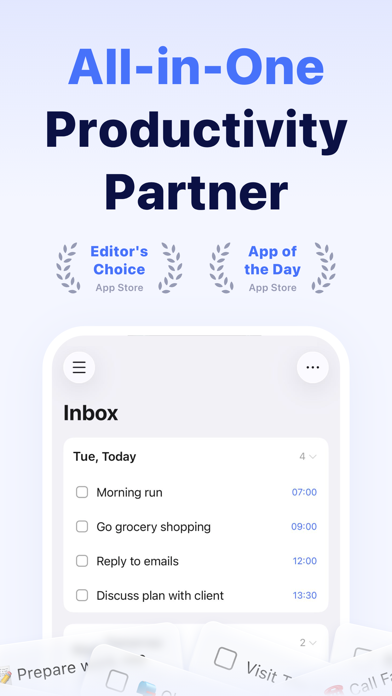
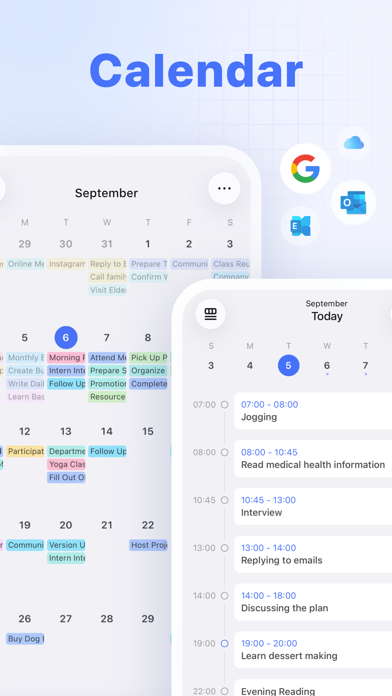
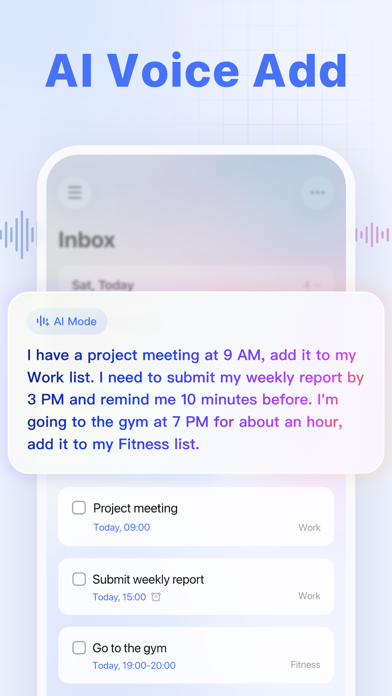
TickTick is a cross-platform task manager from Appest Limited that has quietly absorbed three other tools. The core is a fast, clean to-do app: capture a task, set a due date, add a reminder, drop it into a list or a tag. Around that core sit a Pomodoro timer for timed work sprints, a habit tracker for the things you want to do daily, and a calendar that lays your tasks out across the week. Few task apps bundle this much, and fewer make it feel coherent rather than bolted together.
It runs on iOS, Android, the web, Windows and macOS, and it syncs between them quickly. That breadth matters more than it sounds. Procrastination thrives in the gap between thinking of a task on your phone and acting on it at your desk, and an app that follows you across that gap closes it. The supported methods are familiar productivity ones: time-blocking, the Pomodoro technique, and a light version of Getting Things Done. None of these are exotic, which is part of the appeal. You are not learning a philosophy, you are just getting organised.
How it helps you stop procrastinating
TickTick attacks the disorganised flavour of procrastination, the kind where you avoid work because you cannot see what the work is. Capture everything, break the big scary item into a couple of concrete subtasks, schedule the first one, and the task stops being a cloud and starts being a checkbox. That shift, from ambiguous to specific, is often the whole battle. The app makes capture frictionless, which means fewer things rattling around your head and more of them sitting safely in a list where you can deal with them on your terms.
The built-in Pomodoro timer is the bit that pushes you from planning into doing. Pick a task, start a focus sprint, and the timer holds you to a defined block of work followed by a short break. It is a gentle external structure for people who find an open-ended afternoon paralysing. Paired with the habit tracker, you can also nudge the small daily behaviours that quietly prevent procrastination in the first place, like a five-minute morning review or a daily plan. None of this is forceful. TickTick assumes you want to work and gives you the scaffolding, rather than standing between you and the distraction.
The Pomodoro timer and habit tracker
The Pomodoro feature is more than a stopwatch. You can attach a sprint to a specific task, choose your work and break lengths, layer in a focus soundscape, and review how much focused time you logged over the week. For anyone who finds the blank page intimidating, committing to a single timed block is a far smaller ask than committing to finishing the whole thing, and that lowered barrier is exactly what gets stalled people moving. It is not as specialised as a dedicated sprint app, but having it sit next to your actual task list removes a step.
The habit tracker covers the recurring behaviours a to-do list handles awkwardly. You set a habit, pick a cadence, and check it off, with streaks and basic stats to keep you honest. It is lighter than a purpose-built habit app, and the deeper habit statistics sit behind Premium, but for tracking a handful of daily anchors alongside your tasks it does the job. The point of bundling these is consolidation. One app, one place to look, fewer reasons to drift off into a browser tab while you switch between three separate tools.
Where it falls short
TickTick has no website or app blocking, and that is its biggest limitation as an anti-procrastination tool. It scores a 1 on our blocking-strength index because it simply does not try to stop you reaching a distraction. If your problem is that you open a tab and lose forty minutes, TickTick will dutifully record the task you abandoned, but it will not lift a finger to keep you off the site. For hard blocking you want Freedom, Cold Turkey or Opal, which are built for exactly that and beat TickTick decisively on this axis.
The bundled habit and calendar features, while welcome, are lighter than the dedicated apps in each category. The calendar is useful for laying tasks across your week, but it is not a full scheduling powerhouse, and several of the more advanced calendar views, extra reminders and custom filters need the Premium plan. TickTick is a generalist. It does four jobs competently rather than one job brilliantly, and if you need best-in-class depth in any single area, a specialist will serve you better. As a single hub for an organised, busy person, though, the breadth is the whole point.
TickTick versus Liven, our top pick
These two apps solve different problems, and the honest way to choose is to work out which problem is yours. TickTick is a system. It assumes you already want to do the work and just need a clear, well-organised place to plan and time it. Liven, our number one, works on why you avoid the task in the first place, which is the part a task manager cannot reach. If you keep building beautiful task lists and then not touching them, the issue is usually not your system. It is motivation, avoidance, perfectionism or low mood, and that is the gap Liven aims at.
Liven folds a guided plan, short psychology courses, a habit builder, mood check-ins, focus soundscapes and an AI coach called Livie into one program, built with practising psychologists and grounded in frameworks like CBT and ACT. It is self-guided support, not therapy, and worth saying plainly: Liven has no website or app blocker and no Pomodoro timer, so it does not compete with TickTick on timing or blocking at all. TickTick, in turn, has no guidance and no coaching. They are complementary, not interchangeable.
A reasonable setup for many people is both. Use TickTick to capture, schedule and time the work, and use Liven to deal with the reluctance that stops you starting. If you only have appetite for one app and your stalling is clearly down to disorganisation, TickTick is the stronger pick. If you start tasks fine but keep avoiding the ones that matter, Liven addresses the root cause that no planner can.
Pricing and the no-cost tier
TickTick's no-cost tier is genuinely usable, which is rare. Without paying anything you get tasks, the basic Pomodoro timer and habit tracking, enough to run a real productivity system for many people indefinitely. That makes it easy to test whether the approach suits you before you spend a penny. A great many users never upgrade and are perfectly well served.
Premium runs at roughly $35.99 a year, or about $3.99 a month, and adds the calendar views, more reminders, custom filters and the detailed habit statistics. A Premium trial is offered if you want to sample the paid features first. The price is fair for the breadth on offer, and well below the cost of running separate paid apps for tasks, focus and habits. Cancellation is handled through your app-store subscription, and crucially the no-cost tier remains usable afterwards, so you are not locked out of your own task list if you decide Premium is not for you. Prices here are approximate as of mid-2026, so check the current figures before subscribing.
Privacy, support and the small print
TickTick collects standard account and usage data to run sync and the app's features. On our reading the privacy posture is solid, but as with any app that holds your plans and routines, it is worth reading the current policy yourself before you commit, especially if your task list includes sensitive professional detail. Support comes through a help centre and email rather than live chat, which is fine for a productivity tool of this kind.
One honest caveat about what this app is for. TickTick is a productivity tool built on time-blocking and Pomodoro ideas, not a clinical one. Everyday procrastination is normal and a good system helps with it. But if your avoidance is persistent and tied to something heavier, such as ADHD, anxiety or depression, a better calendar will not be the answer, and it is worth speaking to a professional. An app organises your work. It does not diagnose, treat or cure anything, and TickTick makes no such claims.
Who should use it, and the verdict
TickTick suits people who procrastinate by losing track of what they are meant to be doing, who want a timer and habits living inside their to-do app rather than in three separate places, and who work across several devices and need everything to sync. If that describes you, it is one of the most complete single-app systems available, and the no-cost tier means you can find out for sure at no cost.
It is our runner-up, and the best all-rounder among the planning apps, because it covers more of the procrastination loop than a pure task manager: it plans the work, times the work, and tracks the habits around the work. What it does not do is block a distracting site or address the reasons you avoid starting. It works on your system, not your motivation. Know which of those you need, and TickTick either earns a permanent spot on every device you own or sends you toward a tool that fits the actual problem.
Maker: Appest Limited · Platforms: iOS, Android, Web, Windows, macOS · Approach: Self-guided system · Methods: time-blocking, Pomodoro technique, GTD
TickTick plans & pricing
Free tier: A genuinely usable no-cost tier covers tasks, basic Pomodoro and habits.
Trial: Premium trial offered.
Prices approximate, as of June 2026 — verify on the App Store / Google Play / the app's site. Calendar views, more reminders, custom filters and detailed habit stats need Premium.
Cancellation: Cancel through your app-store subscription; the no-cost tier remains usable.
Feature checklist
- Focus / Pomodoro timerYes
- Website blocking—
- App blocking—
- Scheduled focus / lock modesCalendar
- Tasks & to-do listsYes
- Day / calendar plannerYes
- Habit & routine builderYes
- Focus sounds / musicWhite noise
- Gamification / rewardsAchievements
- Accountability / coworking—
- Time tracking & reportsPomodoro stats
- Reminders & nudgesYes
- Guided plan / courses—
- AI coach / chat—
- Progress insightsYes
- Cross-device syncYes
TickTick pros & cons
What's good
- Rare breadth for a task app: tasks, a built-in Pomodoro timer, habits and a calendar in one
- Excellent no-cost tier and fair Premium price
- Fast, polished, syncs everywhere
What to weigh up
- No website or app blocking
- Habit and calendar features are lighter than dedicated apps
Support
Help centre and email support.
Method & credibility
Built on time-blocking and Pomodoro ideas; a productivity tool, not a clinical one.
Privacy & data
Standard account/usage data; review the policy. Solid on our reading.
Third-party ratings
- 4.8 / 5 on App Store — as of June 2026, verify
- 4.5 / 5 on Google Play — as of June 2026, verify
We report independent ratings with their source and date and never invent them. Figures here are approximate and pending verification before launch.
Our data: TickTick
Two numbers we measure ourselves, on the same 1–5 scale for every app — the things most roundups never score (see all 20 on the compare page):
TickTick FAQ
Does TickTick block distracting websites or apps?
No. TickTick has no website or app blocking, which is why it scores lowest on our blocking-strength index. It can plan and time your work, but it will not stop you reaching a distraction. If hard blocking is what you need, look at Freedom, Cold Turkey or Opal instead, and consider pairing one of them with TickTick for planning.
Is the TickTick no-cost tier good enough on its own?
For many people, yes. Without paying you get tasks, the basic Pomodoro timer and habit tracking, which is enough to run a full productivity system. Premium, at roughly $35.99 a year, adds calendar views, extra reminders, custom filters and detailed habit stats. A Premium trial is available if you want to test those before deciding.
Should I choose TickTick or Liven?
It depends on why you procrastinate. TickTick is the better pick if your problem is disorganisation and you need a clear place to plan and time work. Liven, our top pick, addresses why you avoid tasks in the first place through a guided plan, courses, a habit builder, mood check-ins and an AI coach. Liven has no Pomodoro timer or blocker, so the two work well together if you can run both.