Tide Review: 2026 Overview
The verdict
3.7/ 5 Focus sounds and a Pomodoro timer wrapped in a calm, gently designed app.
Tide is the gentlest way to pair focus sounds with a timer, and its calm design makes starting a session feel inviting rather than disciplinary. It won't block anything or organise your work, so it's a pleasant focus aid alongside a real plan rather than the whole answer.
Tide is the quiet one in this category. Where most focus apps want to gamify, block or nag you, Tide opens to a soft gradient, a short menu of soundscapes and a timer, and then leaves you alone. You pick a sound, rain on a roof, a distant cafe, waves, a forest at night, set the Pomodoro clock, and start working. It pairs two of the oldest focus tricks, ambient sound and timed sprints, in a package designed to feel calming rather than disciplinary. The result is an app that asks very little of you and, in return, does very little to organise your day.
On our scorecard Tide sits at number 10 with a score of 3.7, mid-table, and the split between its strengths and its blind spots explains the placing. As a low-friction way to settle into a stretch of work, it is genuinely good, which is why it earns a 4 out of 5 on our time-to-focus index. As a system for understanding or changing why you keep avoiding the task, it does nothing at all, and it scores the floor of 1 out of 5 for blocking strength because there is simply no barrier in it. Read Tide as a pleasant focus aid that runs alongside a real plan, not as the plan itself.

What Tide actually does
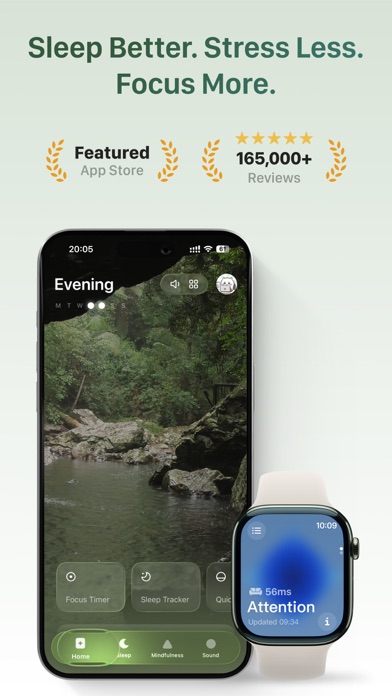
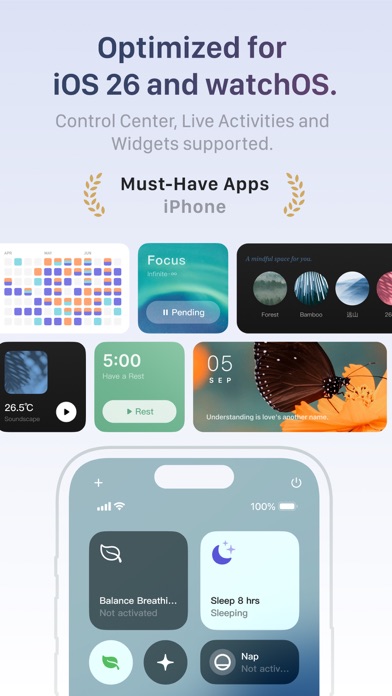
The app is built around two things that work together. The first is a library of focus soundscapes, ambient loops of rain, ocean, forest, cafe murmur and similar textures, meant to give your attention something steady to rest on while you work. The second is a Pomodoro timer that frames your session in timed blocks with breaks between them. Choose a sound, set how long you want to concentrate, and the two run together: the timer counts the sprint, the audio fills the room.
Around that core sit a few gentler extras for the edges of the day. There is a breathing exercise that walks you through a short paced-breathing sequence, and there is sleep and wind-down content for the end of the evening. None of it is essential to the focus loop, but it widens the app from a pure work tool into something you might open before bed as well as before a task. Tide keeps a record of your sessions, so a simple stats view shows how much time you have logged and when.
It runs on iOS and Android and syncs your account across devices, so your settings and history follow you between phones. That is the whole shape of the app. Tide is deliberately small, and the restraint is part of its appeal. Nothing here is clamouring for your attention, which is a rare quality in a category that usually treats friction as a feature.
The calm-design hook, and why it lands
Plenty of focus apps make starting feel like a test of willpower. A loud streak you might break, a tree that will die, a stern report on your wasted hours. Tide goes the other way. Opening it is closer to lighting a candle than clocking in. The soft palette, the unhurried animations and the absence of any scolding all combine to make the first move, the hardest move, feel inviting rather than effortful.
That matters more than it sounds, because a great deal of procrastination is friction at the very start. The task feels heavy, the app you would use to begin feels like another small demand, and so you reach for the phone instead. Tide lowers that opening cost. There is almost no setup between deciding to work and being in a session, which is why we rated it a 4 out of 5 on our time-to-focus index. The sound becomes a cue: when it starts, work has started.
The honest limit of the trick is that the calm is doing the work, and calm is a modest lever. It helps you begin and it helps you stay settled through a sprint. It does not touch the reasons the sprint felt hard to start in the first place, and for some people that gap is the whole problem.
The sounds and the breathing extras
The soundscapes are the heart of Tide and they are well made. The loops are long enough that you do not notice them repeating, the recordings are clean, and the mix leans toward the natural and unobtrusive rather than the synthetic. For people who already know that ambient sound helps them concentrate, this is a comfortable place to live. Ordinary music tends to grab you, you notice the words, you skip a track, and the skipping becomes its own distraction. A steady soundscape recedes, which is exactly what you want from background audio.
The breathing exercise is a small, sensible addition rather than a headline feature. A minute or two of paced breathing before a session can take the edge off the restlessness that makes you bounce away from a task, and Tide makes that easy to reach. The sleep and wind-down content serves a similar role at the other end of the day. None of this is treatment, and the app does not present it as such. Think of these as gentle nudges toward a steadier state, useful for some people, skippable for others.
It is worth being plain about what the extras are not. They do not plan your work, they do not hold you accountable, and they do not address avoidance in any structured way. They round the app out, but they do not change what it fundamentally is, which is a focus-sound and timer tool with a calm bedside manner.
Where it falls short
The hard limit is that Tide does nothing about the work itself. There is no task manager, no planner, no scheduling beyond the timer, and no guidance about what to do or why you keep putting it off. It plays sound and counts time, and when you stop, it stops. If the reason you stall is that you do not know where to start, or that the task makes you anxious, the audio has no answer for that. It is a pleasant atmosphere, not a system.
It also blocks nothing, which is why it scores a 1 out of 5 on our blocking-strength index, the floor. There is no website blocker, no app blocker, nothing to stop you opening a distracting tab while the rain plays in the background. If your procrastination is a tab-switching or phone-checking habit, Tide will quietly soundtrack the very behaviour you are trying to break. The calm is real, but calm is not a barrier.
And there are no habits, no streaks, no accountability and no AI coaching. Tide is closer to a nice atmosphere than a serious anti-procrastination programme, and it does not pretend otherwise. That honesty is to its credit, but it also caps how far the app can take you. It protects a session and then hands you straight back to whatever structure, or lack of one, you already had.
Pricing and what you get
Tide runs on a familiar model: a generous no-cost tier with a Premium subscription on top. The tier you can use without paying covers the core focus soundscapes and the Pomodoro timer, which is most of what the app is for. You can run timed sessions to a soundscape indefinitely without spending anything, and for a lot of people that is genuinely enough.
Premium costs around 3.33 dollars a month when billed yearly, which is cheap by the standards of this category. What it unlocks is breadth rather than a different kind of app: the full sound library, the sleep and meditation content, and the more detailed stats. A trial is offered so you can sample the wider library before committing. There is no website blocker or planner hiding behind the paywall, because those features do not exist in Tide at any tier.
As a buying decision this is low-risk. The no-cost tier is usable on its own, the subscription is inexpensive, and you can cancel through your app-store subscription whenever you like, after which the no-cost tier remains. The honest test is the trial: pay attention to whether the extra sounds and content actually make you work longer, not just whether they are pleasant to have.
Who it suits
Tide is at its best for people who want focus and calm in the same place. If a soundscape genuinely helps you concentrate, and you like the idea of a timer that does not feel like a taskmaster, this is one of the gentlest ways to get both. It suits noisy environments well, the open office, the shared flat, the cafe, where a steady ambient track gives your attention something neutral to settle on.
It also suits anyone who finds most focus apps a little aggressive. If streaks make you anxious and a withering tree feels like pressure rather than motivation, Tide's low-key design is a relief. The breathing and wind-down extras add to that, making it a reasonable single app for the quieter edges of the day as well as the work in the middle of it.
It is a poorer fit if your distractions live across devices and you need enforced blocking, or if your procrastination is rooted in avoidance, perfectionism or not knowing how to begin. A calm soundscape is a fine companion to a plan, but it is no substitute for one. Pair Tide with a proper task manager or a programme that works on the habit, and it earns its place. Ask it to be the whole answer and it cannot carry that weight.
Tide compared with Liven, our number one
Tide and Liven, the app at the top of our scorecard, sit on opposite sides of the same problem. Tide treats the symptom: it gives you a smoother, calmer on-ramp into a single stretch of work. Liven works on the cause, the question of why you keep avoiding the task before the timer even starts. Comparing them shows the trade-off plainly.
Liven is built around motivation and behaviour rather than sound. It offers a guided plan, short psychology-based courses, a habit builder, mood check-ins, focus soundscapes of its own and an AI coach called Livie, all aimed at the low motivation, avoidance, perfectionism and weak habits that sit underneath chronic procrastination. Where Tide helps you settle into the next half hour, Liven tries to change the pattern that keeps you from beginning at all. It is the difference between a nice atmosphere and a programme.
Be clear about Liven's gaps, because they matter in this comparison. Liven has no website or app blocker and no Pomodoro timer, and its focus audio is one part of a wider plan rather than a polished standalone library. On the two things Tide is built for, getting you focused fast and providing pleasant ambient sound, Tide is the stronger pick, and that shows in Tide topping our time-to-focus index where Liven does not. If you want hard blocking, Freedom, Cold Turkey and Opal go much further than either app. If you want the very quickest start, Forest, Be Focused and Session are fast too. If you want a proper task system, TickTick and Todoist are better at that, and for ADHD specifically, Tiimo and Focusmate lead. The honest read is that Tide and Liven complement each other: Tide for the soundtrack and the timer, Liven for the habit underneath them.
Living with it day to day
In practice Tide becomes a small ritual. You open it, pick a sound, set the timer, and the act of doing so signals that work has begun. That cue, repeated, is part of why the app sticks for the people it suits, and it asks almost nothing of you to maintain. There is no streak to protect and no garden to tend, just the sound and the clock and whatever you are meant to be doing.
The flip side is that the calm can fade into wallpaper. Once a soundscape is familiar it stops being a cue and becomes ordinary background, and some people find the focusing effect softens after a few weeks. That is not a flaw so much as the nature of any repeated stimulus, and it is worth knowing before you settle on it as your main tool. Support runs through email and help docs, and the privacy footprint is the standard account and usage data you would expect from an app like this, which is worth a glance at the policy. None of that is dramatic, which is the right tone for a tool meant to stay quietly in the background.
The verdict
Tide is the gentlest way to pair focus sounds with a timer, and its calm design genuinely makes starting a session feel inviting rather than disciplinary. It earns its 3.7 and its mid-table spot on the strength of doing two modest things well, getting you settled and holding your attention through a sprint, and on the unusual restraint of an app that refuses to nag.
What keeps it from climbing is that it is exactly that and no more. It will not block anything and it will not organise your work, so it cannot touch the reasons you stall in the first place. Pair it with a real plan and, for the right person, it is close to ideal in its lane. Ask it to be your whole answer to procrastination and it cannot carry that weight, because a nice atmosphere was always the point of it.
Maker: Moreless, Inc. · Platforms: iOS, Android · Approach: Self-guided · Methods: Pomodoro technique, focus sounds, breathing
Tide plans & pricing
Free tier: A generous no-cost tier covers focus sounds and the timer.
Trial: Premium trial offered.
Prices approximate, as of June 2026 — verify on the App Store / Google Play / the app's site. The full sound library, sleep and meditation content and stats sit in Premium.
Cancellation: Cancel via your app-store subscription; the no-cost tier remains.
Feature checklist
- Focus / Pomodoro timerYes
- Website blocking—
- App blocking—
- Scheduled focus / lock modes—
- Tasks & to-do lists—
- Day / calendar planner—
- Habit & routine builder—
- Focus sounds / musicYes
- Gamification / rewards—
- Accountability / coworking—
- Time tracking & reportsFocus stats
- Reminders & nudgesYes
- Guided plan / courses—
- AI coach / chat—
- Progress insightsYes
- Cross-device syncYes
Tide pros & cons
What's good
- Lovely focus soundscapes plus a Pomodoro timer in a calming package
- Generous no-cost tier and cheap Premium
- Breathing and sleep extras for the edges of the day
What to weigh up
- No blocking, planning or habits
- More 'nice atmosphere' than serious anti-procrastination system
Support
Email and help docs.
Method & credibility
Focus-sound and Pomodoro ideas; a focus aid, not treatment.
Privacy & data
Standard account/usage data; review the policy.
Third-party ratings
- 4.7 / 5 on App Store — as of June 2026, verify
- 4.3 / 5 on Google Play — as of June 2026, verify
We report independent ratings with their source and date and never invent them. Figures here are approximate and pending verification before launch.
Our data: Tide
Two numbers we measure ourselves, on the same 1–5 scale for every app — the things most roundups never score (see all 20 on the compare page):
Tide FAQ
Does Tide block distracting websites or apps?
No. There is no blocker of any kind in Tide, which is why it scores a 1 out of 5 on our blocking-strength index. It plays focus sounds and runs a Pomodoro timer, and nothing stops you opening a distracting tab or app alongside it. If your procrastination is a tab-switching or phone-checking habit, the sound will simply soundtrack it. For enforced blocking that genuinely holds, tools like Freedom, Cold Turkey or Opal go far further. Tide is a calm focus aid, not a barrier.
Is Tide worth paying for?
It can be, with the right expectations. The no-cost tier already covers the core soundscapes and the timer, which is most of what the app does, so a lot of people never need to pay. Premium is around 3.33 dollars a month billed yearly, which is cheap, and it adds the full sound library, sleep content and more detailed stats. A trial lets you test the wider library first. You are buying breadth, not a new kind of app, so judge it by whether the extra sounds make you work longer, not just by whether they are pleasant. You can cancel through your app store and keep the no-cost tier.
Will Tide fix my procrastination?
It can make it easier to start and to stay settled through a stretch of work, which for sound-led focus is a real help. It will not address why you procrastinate, because it has no planner, tasks, habits, blocking or guidance underneath the sound and the timer. If your avoidance runs deeper and ties to something like ADHD, anxiety or depression, treat the app as one tool among several and consider speaking to a professional. An app is a support, not treatment.